


Rythmix: AI Music & Song Maker
4.2533.00 Reviews
App Specs
- Version
- 1.18.5
- Updated On
- License
- Free
- Downloads
- 5,000,000+
- Developer
- PROMINENT FORTUNE PTE. LTD.
- Categories
- Music & Audio
- Platform
- Android
Screenshots


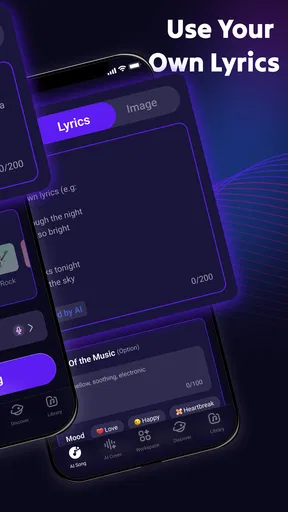
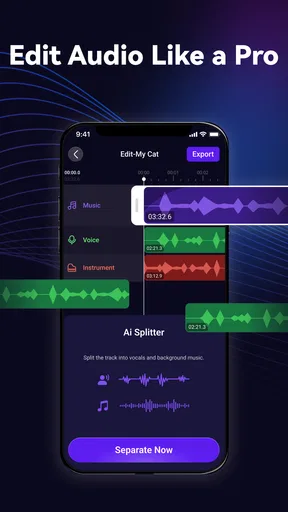
 Analysis by AppCompare
If you’re anything like me and have always dreamed of making your own music but don’t have the skills of a professional musician, Rythmix: AI Music & Song Maker might be an inviting place to experiment. I think of it less as a replacement for a full recording studio and more as a phone-based way to turn a musical idea into something you can hear and share. That distinction matters: the appeal is getting started quickly, not mastering every part of production.
Because the app creates music with AI, the experience is shaped by more than your choices on screen. The app needs to do work behind the scenes, so I would plan to explore it when I have a dependable connection rather than assume every creation step will be available without one. A weak signal can turn a quick burst of inspiration into a wait, which is worth considering if you usually make things while commuting or away from Wi-Fi.
When a connection becomes part of the creative process
My practical advice is to separate choosing an idea from finishing a track. I might jot down a mood or a rough concept while away from home, then open the generator when I have a stable connection and time to listen through the result. That simple routine makes a network-dependent creative session feel less frustrating: I arrive with a direction instead of tapping around while waiting for inspiration and a response at the same time.
Connectivity also affects how I would judge a generated track. If a result takes a while to arrive, I would avoid repeatedly changing options and starting over just to see what happens. I’d first decide what I want to change—perhaps the overall feel or the balance of the sound—then try one adjustment at a time. That is not only easier to follow; it also helps me tell whether a new version is genuinely closer to the idea I had.
A phone-sized workspace, with sensible expectations
For a casual evening, a phone is a convenient place to sketch out something playful. I can imagine making a short musical idea for a family video, a joke between friends, or a personal creative challenge, then listening back before deciding whether it is worth sharing. This kind of use suits Rythmix better than expecting a tiny screen to serve as a detailed production desk for a polished release.
The app’s focus on AI-generated music makes it different from a conventional audio editor, where the user usually builds a track by arranging sounds and shaping each part directly. It also differs from simply browsing a streaming service: here, the point is to make a new piece rather than choose a finished song. If you want precise control over every note, a dedicated music workstation is likely a better fit. If you mainly want a low-barrier starting point, this approach is more approachable.
What to do when a session stalls
If generation or sharing seems to pause, I would check the connection before assuming the project is lost. Moving from a weak mobile signal to reliable Wi-Fi, then reopening the relevant screen, is a calmer first step than repeatedly tapping controls. I’d also make a habit of checking that a track has finished processing before leaving the app or switching tasks, especially when I care about keeping a particular result.
Worth Reading Before You Choose

Flipboard Shows What News Apps Must Do Beyond the Feed

Switching to Android Auto Means Rethinking Your Driving Routine

Google Calendar Makes a Crowded Week Easier to Manage

Ludo King Makes the Most of the Minutes Between Plans

Baby Panda World Brings Quick Play to Modern Phones, but Its Game Library Feels Busy

ESPN’s Live Game View Makes Following Close Games Easier
Sharing is another moment when connectivity matters. I would listen to the finished piece first and make sure it is the version I actually want to send, rather than treating export as an afterthought. For a casual post, that small review can prevent an unfinished or unintended take from becoming the one friends hear. If the connection is unreliable, I’d wait until I can complete the share in one go instead of assuming it will resume exactly where I left off.
Using mobile data with a little thought
AI creation and sending audio can use mobile data, so I would be deliberate about long sessions away from Wi-Fi. A useful habit is to explore a few ideas at a time, listen carefully, and make targeted changes instead of generating versions without a clear purpose. That keeps the process focused and helps avoid spending data on experiments I was unlikely to keep anyway.
I would also treat in-app purchases as a separate decision from whether the app is worth trying. It is free to download, but optional purchases are listed from $5.99 to $99.99 per item. I’d spend time with the free experience first and only consider paying if I understood what I wanted from it and how often I expected to use it. That is especially sensible for a novelty-driven creative app, where a burst of curiosity may not turn into a long-term habit.
Rythmix is a music and audio app from PROMINENT FORTUNE PTE. LTD. It has a 4.0 average from around 22,000 ratings, and over one million installs, which gives a new user a sense of its reach without telling me whether its particular workflow will suit them. It is free, rated for Everyone, and its current version is 1.12.5, with Android 6.0 or later required. The app was released on October 29, 2024.
It is best suited to curious beginners, people who enjoy playful creative tools, and anyone who wants to explore AI-made music without first learning an instrument. I would steer away if I needed a dependable offline composing setup, detailed mixing controls, or a guaranteed professional result. Those needs call for a more traditional production app and a workflow built around direct editing.
Getting Started with Rythmix
The first thing you’ll notice when you download Rythmix is how user-friendly it is. From the moment you open it, the app greets you with a clean and intuitive interface that even the most technologically challenged among us can navigate. You don’t need to be a tech wizard to start creating music, and that’s what makes this app stand out.
Once you’re in, you’re guided through the basics with a helpful tutorial. This ensures you’re not left scratching your head wondering how to get started. It’s like having a friendly mentor walking you through the process, which I found incredibly helpful. I would still take a moment to look around before starting a project: knowing where the main creation and sharing actions are makes later sessions feel less like trial and error, especially on a small screen.
Features That Hit the Right Note
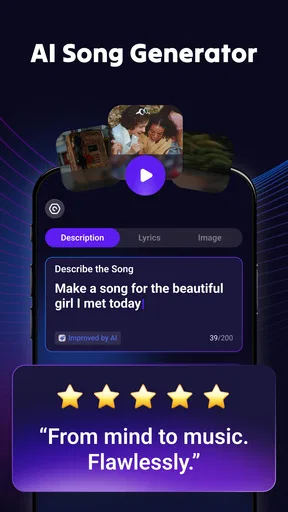
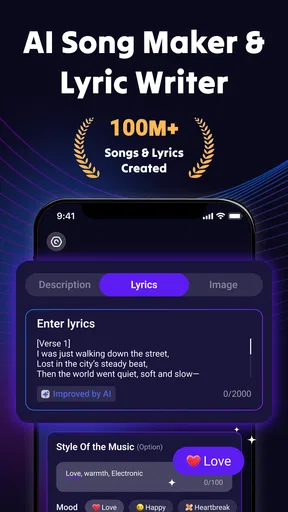
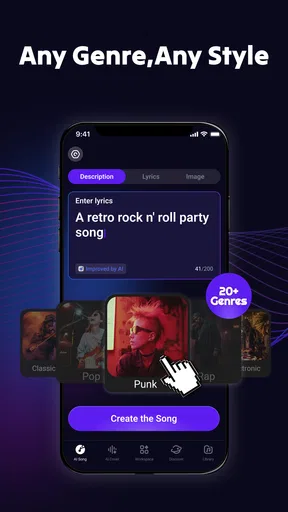
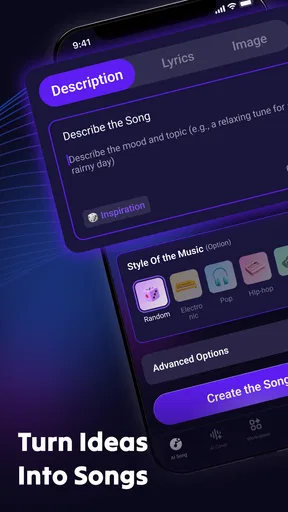
One of the coolest features of Rythmix is its AI-powered music creation tool. You simply select your preferred style, and the app’s AI does the heavy lifting by generating a unique melody for you. Whether you’re into jazz, pop, or EDM, Rythmix has got you covered. The variety of styles available ensures that there’s something to suit every musical taste. In practice, I’d treat those style choices as starting points rather than promises of a particular sound; a broad label gives you a direction, while listening and adjusting helps decide whether the result fits your purpose.
Another feature that I found particularly engaging is the ability to tweak the generated tracks. You can adjust the tempo, change the key, or even swap out instruments until you get that perfect sound. It’s like having a digital band that’s always ready to jam with you. My useful tip here is to change one element at a time and compare the result with the previous version. If I alter the tempo, key, and instrumentation all at once, it becomes hard to tell which choice helped—and harder to return to the sound I liked.
That workflow is also a good way to decide when the app has done enough. A generated idea may be entertaining without being a finished song, and endless tweaking can make a simple experiment feel like work. I’d use Rythmix to find a mood, a hook, or a playful backdrop, then move to a more hands-on editor if I needed detailed arrangement or precise control over individual parts. The trade-off is clear: Rythmix lowers the barrier to hearing an idea, while a conventional workstation gives the user more deliberate control.
Recording and Sharing Made Easy
Once you’ve crafted your masterpiece, Rythmix makes it easy to record your track. The built-in recording feature is straightforward and doesn’t require any additional equipment. Just hit the record button, and you’re all set. I’d still listen back before treating a recording as final. A quick check with headphones can help me notice whether the result feels right for the person or occasion I have in mind, rather than sharing the first take simply because it is ready.
Sharing your creations is just as simple. You can easily export your tracks and share them on social media platforms, or send them to friends and family. It’s a fantastic way to showcase your musical talents to the world or just have a bit of fun with your inner circle. For example, if I wanted a lighthearted birthday greeting, I could make a short idea, listen to it privately, and send it only once I was happy with the mood. That is a better fit than relying on the app for a carefully mastered song intended for a formal release.
One question I’d ask before sharing widely is whether the track is meant to be a personal joke, a rough creative sketch, or something I want to use in a more serious project. Those are different standards. For a friend, an unexpected AI-made tune can be part of the fun; for a public project, I’d want to review the sound carefully and make sure it meets my own quality and usage needs before building anything around it.
Why You’ll Love It
What really makes Rythmix shine is its accessibility and the way it empowers users to create music effortlessly. You don’t need a fancy setup or years of musical training. Just your smartphone and a bit of creativity. I can see it working especially well in a small everyday window: during a quiet evening, I might try a style I normally wouldn’t listen to, adjust the tempo, and make a playful clip to share in a group chat. It is a low-pressure way to turn a spare moment into something more memorable.
The app also keeps things fresh with regular updates and new features. This ensures you’re always getting the best experience and never run out of inspiration. The developers clearly listen to their users and are committed to providing a top-notch music-making experience. For my own use, I would still judge an update by how it affects the workflow I rely on: does it make it easier to start, shape, or share an idea? That matters more than a longer feature list.
If there’s one thing I’d love to see improved, it might be the addition of a collaborative feature, where you can work on tracks with friends in real time. But honestly, the app is already loaded with so much goodness, this is just me being picky. Without that kind of shared session, I’d treat it as a tool for making an individual draft and then sending it out for reactions, rather than a place to build a track together live.
There are a few situations where I’d choose something else. If I needed to compose while disconnected, I would pick an app whose offline workflow I already knew. If I wanted to record instruments or refine a mix in detail, I’d choose a dedicated audio editor. And if I only wanted music to listen to, a streaming app would be more direct than creating a track. Rythmix makes the most sense when the goal is experimentation, not when every part of the music needs exact control.
For a first session, I’d keep the goal modest: choose one style, make a single idea, adjust one or two elements, and listen before exporting. If the result makes me curious to try another direction, the app has done its job. If I find myself wishing I could edit every musical detail, that is a useful sign that I have outgrown this particular tool for that project, not that I need to keep forcing the same workflow.
So, if you’ve ever wanted to dip your toes into music creation without the steep learning curve, give Rythmix a try. It’s a fun, creative outlet that might just unleash your inner musician. I’d recommend it to someone who wants quick inspiration and is happy to experiment, while being clear that a stable connection and realistic expectations make the experience smoother. The app is less compelling for people who need offline reliability or studio-level control, but for casual idea-making it offers a friendly place to begin.
Ready to turn your musical dreams into reality? Download Rythmix: AI Music & Song Maker today and start making some noise!
Pros
- Intuitive interface for easy music creation.
- Wide variety of instruments and sounds.
- AI-generated suggestions enhance creativity.
- Real-time collaboration with other users.
- High-quality export options for tracks.
Cons
- Limited free version features.
- Occasional lag on older devices.
- In-app purchases can be pricey.
- Requires internet for some features.
- Learning curve for advanced tools.
FAQs for Rythmix: AI Music & Song Maker
What is Rythmix: AI Music & Song Maker?
Rythmix is an innovative app that allows users to create music and songs using AI technology. It provides a user-friendly interface for both beginners and experienced musicians to compose, edit, and share their musical creations. With a variety of instruments and effects, it's a versatile tool for music enthusiasts.
How does the AI feature in Rythmix work?
Rythmix employs advanced AI algorithms to assist users in composing music. The AI can suggest chord progressions, generate melodies, and even provide harmonization options. This feature is particularly helpful for those who are new to music composition, offering guidance and inspiration throughout the creative process.
Is Rythmix suitable for beginners?
Absolutely! Rythmix is designed to cater to users of all skill levels. Its intuitive interface and helpful tutorials make it easy for beginners to start creating music right away. The app also includes pre-set templates and a wide range of instruments to experiment with, making learning both fun and engaging.
Can I share my music creations directly from Rythmix?
Yes, Rythmix allows users to share their musical creations directly from the app. You can export your songs in various formats to share on social media or with friends. Additionally, the app supports integration with popular platforms, making it simple to showcase your music to a wider audience.
What are the in-app purchase options in Rythmix?
Rythmix offers a free version with basic features, but users can access premium features through in-app purchases. These purchases may include additional instruments, sound packs, and advanced editing tools. There are also subscription options for those who want unlimited access to all features and regular updates.


